
Skip to content

Want to Join Castle Rock PEP?

We’re excited to meet with you via Zoom to explore how to serve your team’s needs. Here’s some helpful information to guide our conversation.

Did You Miss the 2026 Onboarding Paperwork Party?

Read about what you missed

Don't miss out on all the benefits of joining our Community for the upcoming year.

This isn't just a retirement plan. When you join Castle Rock PEP, you get:

  • Personalized investment advice
  • Free financial planning software
  • Community spotlights to promote your business
  • Human support--from a firm led by a woman who's been advising workplace retirement plans for over two decades
Onboarding Timeline

Two Paths to Join Castle Rock PEP

1. Fast-track online plan setup using code CRP401k

You will want to have on hand:

  • Company EIN/Tax ID
  • The company owner(s) names and their ownership percentage
  • The names and job titles of all employees who are lineal relatives of an owner
  • The names and job titles of all highly compensated employees
  • Name and job titles of all company officers

2. Fill Out the Paperwork Listed Here and Upload through its Secure Portal

Don't hesitate to schedule a meeting if you want our assistance.

Payroll Integrations

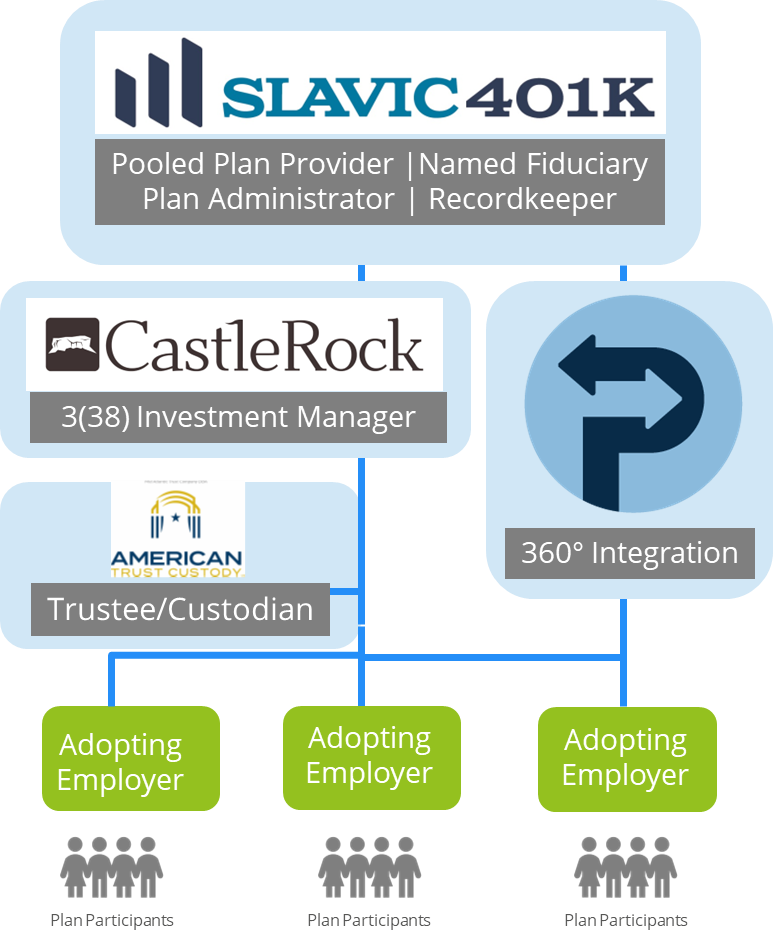
360 Degree Payroll Integration

Please also check out our business partner, https://www.payrollintegrations.com/payroll-partners, to see if your payroll provider is already working with them. 360 degree payroll integration + Slavic401k = Angels singing!

Please also check out our business partner, https://www.payrollintegrations.com/payroll-partners, to see if your payroll provider is already working with them. 360 degree payroll integration with Slavic401k = Angels singing!

Choose one of our three most popular safe harbor plan designs. 

All three plans automatically enroll employees after three months of service with a 3% savings rate that increases 1% each year up to 10%. Employees can opt out at any time.

The Employer chooses the contribution amount:

  1. 3% contribution to everyone with immediate vesting

  2. 3.5% to savers as a match with up to two years vesting

    • 100% Match on first 1%, 50% Match on next 5%
    • Employee saves 6%, then Employer contributes 3.5%
  3. 4% to savers as a match with immediate vesting

    • 100% Match on first 4%
    • Employee saves 4%, then Employer contributes 4%
    What to learn more? Check out this Blog post about Safe Harbor plans.

Common Safe Harbor Plan Designs

Below is a chart of common safe harbor plan designs.


Employer Contribution

Vesting

Recipients

Automatic Enrollment

Qualified Automatic Contribution Arrangement

3.5% Match

Up to 2 yrs.

Savers

Required

Qualified Automatic Contribution Arrangement Nonelective

3%

Up to 2 yrs.

Eligible employees

Required

Safe Haror Match

4% Match

Immediate

Savers

Required

Safe Harbor Nonelective

3%

Immediate

Eligible employees

Required

Enhanced Safe Harbor Match

4% Match or More

Immediate

Savers

Required

Enhanced Safe Harbor Nonelective

3% or more

Immediate

Eligible employees

Required


Remember:

  • Employer contributions are not required
  • Automatic enrollment is required for new plans
  • Avoid state-mandated retirement plans and fines

Are You an HCE and Why Would You Care?

Who qualifies as a Highly Compensated Employee (HCE)?
 

According to IRS guidelines, an HCE typically falls into one of three categories:

1) anyone who owns more than 5% of the company

2) family members of someone who owns more than 5% (including spouse, parents, children, or grandparents), or

3) employees who earned more than $155,000 in the previous calendar year (2024 limit; this amount is subject to annual IRS cost-of-living adjustments). 

The IRS requires 401(k) plans to undergo several compliance—or “nondiscrimination”—tests each year. These tests ensure that all employees, regardless of their compensation level, are treated fairly by the plan. 

Safe harbor plans provide a streamlined path to compliance. By following specific rules on employer contributions, vesting schedules, and employee notifications, safe harbor plans automatically satisfy the IRS’s nondiscrimination testing requirements.

  • $500 for three years

    To add automatic enrollment plan provision.

  • $250 for startup costs in first three years

    Per eligible non-highly compensated employee up to $5,000 each year.

  • $1,000 per employee

    For employer contribution to participants earning up to $100,000. Gradually reduces over five years. See IRS Form 8881.

TREASURY/IRS AND OMB USE ONLY  ·  DRAFT — DO NOT FILE

Form 8881 (Rev. December 2025)

Department of the Treasury · Internal Revenue Service

Credits for Small Employer Pension Plan Startup Costs, Contributions, Auto-Enrollment, and Military Spouse Participation

Attach to your tax return. Visit IRS.gov/Form8881 for instructions and the latest information.

Part I – Small Employer Pension Plan Startup Costs Credit (and Contributions Credit)

Section 1—Small Employer Pension Plan Startup Costs Credit

1 Qualified startup costs incurred during the tax year
2 Employers with 1–50 employees enter the amount from line 1. Employers with 51–100 employees enter 50% (0.50) of line 1
3 Enter the number of employees eligible to participate in the pension plan (see instructions) × $250
4 Enter the greater of $500 or the amount from line 3 (do not enter more than $5,000)
5 Enter the smaller of line 2 or line 4

If you are not calculating the credit for employer contributions, skip Section 2 and go to line 7.

Section 2—Small Employer Contributions Credit

6a Enter the number of employees from the preceding tax year (see instructions)
6b Employer contributions made to the plan (see instructions; exclude elective deferrals and other disallowed amounts)
6c For employees with matching and nonelective contributions of more than $1,000 (but not disqualified under line 6b(ii)), see instructions. If not applicable, enter -0-
6d Add lines 6b and 6c

If the number of employees on line 6a is 50 or less, enter the amount from line 6d on line 6f. If 51–100, complete lines 6e(1)–6e(4).

6e(1) Subtract 50 (50.0) from the number of employees on line 6a
6e(2) Multiply line 6e(1) by 2% (0.02)
6e(3) Multiply line 6e(2) by line 6d
6e(4) Subtract line 6e(3) from line 6d
6f If you did not complete line 6e, enter the amount from line 6d. If you completed line 6e, enter the amount from line 6e(4)
6g Applicable percentages (see instructions). Use:
  • First or second plan year: enter the amount from line 6f.
  • Third year: line 6f × 75% (0.75).
  • Fourth year: line 6f × 50% (0.50).
  • Fifth year: line 6f × 25% (0.25).

Section 3—Total Credits from Part I

7 Credit for small employer pension plan startup costs and credit for contributions from partnerships and S corporations
8 Add lines 5, 6g, and 7. Partnerships and S corporations report this amount on Schedule K; all others report this amount on Form 3800, Part III, line 1j

Part II – Small Employer Auto-Enrollment Credit

9 Enter $500 if an auto-enrollment option is provided for retirement savings (see instructions)
10 Small employer auto-enrollment credit from partnerships and S corporations
11 Add lines 9 and 10. Partnerships and S corporations report this amount on Schedule K; all others report this amount on Form 3800, Part III, line 1dd

Part III – Small Employer Military Spouse Participation Credit

Caution: You can't claim this credit if you had more than 100 employees in the preceding tax year.

12 Enter the number of military spouse employees participating in an eligible plan (see instructions) × $200
13 Amount of contributions paid by employer for each eligible military spouse employee (do not enter more than $300 per employee; see instructions)
14 Credit for small employer military spouse retirement plan from partnerships and S corporations
15 Add lines 12, 13, and 14. Partnerships and S corporations report this amount on Schedule K; all others report this amount on Form 3800, Part III, line 1ee

This is an unofficial, web-friendly version of IRS Form 8881 created for informational/educational use on your site. Taxpayers should consult the official IRS form and instructions when filing.


Built for every business

No business too large or too small.

Quick setup

Get started today with the online plan setup or schedule a PEP talk if you have questions.

Easy to use

We take care of the investments and administration for you.

Customizable

Each business chooses their own plan design.
Our values

Transparency. Honesty. Trust. Creative Solutions.

This is what you can expect when you work with Castle Rock Investment Company.

We believe

You always come first. You will always know what you are paying for when you trust us with your finances. No hidden fees. No commissions.